

Capture One vs Lightroom for Food Photographers
Is Capture One better than Lightroom for food photographers? Or has Lightroom got the upper hand over Capture One Pro? This is the Capture One vs Lightroom for Food Photographers battle.
Read on to find out my comparisons …
This is PART 1 of a 2-part post. Read PART 2 here.
Background
I’ll start off by saying I think I am a pretty experienced Lightroom user. I have used Lightroom since way back in 2006 with their beta program. 15+ years is a good time to get used to a product I reckon. It’s important to keep ones’ mind open with any software product and never to silo yourself with just one offering. Yes, whilst switching products too frequently will stop you mastering anything, at least getting to know other products will enable you to determine of there are better tools.
As for Capture One, I have used this on and off for a few years, its very different than Lightroom and requires a bit of a learning curve which I never really allowed too much time in the past. At the beginning of 2021 as work was a bit slow due to the pandemic, I decided to give Capture One a really solid shot. I promised to myself I would only use Capture One and not touch Lightroom for a year.
I tweaked my photography workflow, and pushed Lightroom to one side.
Here are my thoughts on Capture One vs Lightroom for Food Photographers.
Pros of Lightroom
- Familiarity of the product. At least for me, as a long term user of Lightroom, I can find the tools fast and know how to use them.
- Less steep learning curve. Adobe has a long history of image editing products and they all feel the same, generally speaking. Lightroom is an easy product to start using.
- Plenty of online resources, YouTube etc – the internet has Lightroom videos and tutorials in every corner. If you don’t know how to do something in Lightroom is very easy to find some instruction on it.
- Better roundtrip to Photoshop. Lightroom has excellent editing tools, sometimes you need to go that one step further and edit in Photoshop. Opening an image from Lightroom into Photoshop, do your edits and save, and you will see the edit in Lightroom, and the image will be saved in the right place. Pretty seamless.
- Better DAM (Digital Asset Management) module. Powerful image management system. Use Lightroom to manage your locations, keywording, deleting , moving, tagging etc instead of Windows Explorer and Finder. Easy Smart collections that work really well.
- Cost £10 now only available on a subscription model, and it’s less than two drinks at your local each month.

Lightroom
Pros of C1
- Customisable toolbars – move the tool bars around and the tools on them, to suit your workflow. Hide tools you don’t use, and even repeat tools on different toolbars if that suits you better. Helps with your workflow efficiency.
- Better image quality out of the box. Questionable – a lot of debate on whether images in Capture One look better when you first open them, compared with Lightroom. I think they do, but I think Lightroom could be tweaked with your own profiles as well. I will leave it here, under the Pros of Capture One, but take it with a pinch of salt.
- Better colour management editing – but possibly even better for portrait photographers. Controls of colours and hues are much more refined in Capture One than in Lightroom.
- Cost option of one off cost or subscription model.
- Better tethering clear winner here with Capture One, which was designed with studio tethering in mind. Tethering in Capture One is light years ahead of Lightroom, especially with Nikon.
- Performance , Capture One is super fast when editing using a Wacom tablet, whereas Lightroom can have some lag. Although Lightroom’s performance has improved over the last few releases.
Cons of LR
- Performance using Wacom tablet – as above, I have had a lot of issues, and it’s reported widely on the internet about laggy response. However it’s mostly fixed now.
- Tethering, especially Nikon, but Capture One is the gold standard. Tethering is poor in Lightroom. So many features missing that Capture One has.
Cons of C1
- DAM – (Digital Asset Management) – The orgaising and library feature is awful. This is the worst part and the main reason I just cannot get on with Capture One. The organisation of the file structure is cryptic, the collections of albums inside Capture One don’t make sense, the SMART albums just don’t work reliably. The SMART albums seem to scan the file system each time you open it and it can take 20 secs to see your images, and this happens each time you open Capture One. With Lightroom, the previews in the Smart Folders are cached and it’s instant to view them. I have been told this is the same in Capture One, but I don’t see evidence of it. I, and many others, have logged technical support tickets , with no resolution. It has been like this for years and several releases.
- Online resource , it’s getting a bit better, but not as many YouTube or blog resources, certainly not as much as Lightroom.
- Technical support , logged some tickets about the problem with the asset management and particularly SMART albums. Unresolved to date.
Costs of Each – Capture One vs Lightroom
Subscription model vs Outright purchase.
Not getting into this argument, it’s a subject that can’t be won and there are already a million debates across the internet. Notice I put cost as a Pro in each. Capture One does offer both payment models.
Lightroom costs about £10/month (and includes Photoshop) and perpetual upgrades.
Capture One Pro costs about £299 for a one off payment, or £24 Per month.
Paying outright gives you the satisfaction of ‘owning’ the software, use it as long as you like. Monthly payment model gives you free upgrades.
But if you buy Capture One and still want to use Photoshop, you are really increasing your costs.
And if you pay for Lightroom, and stop your subscription, you can’t just use the software perpetually (you may not care about latest features), but you can’t use it at all.
Many hobbiest or non professi9nal photographers don’t care about using software 5 years old.
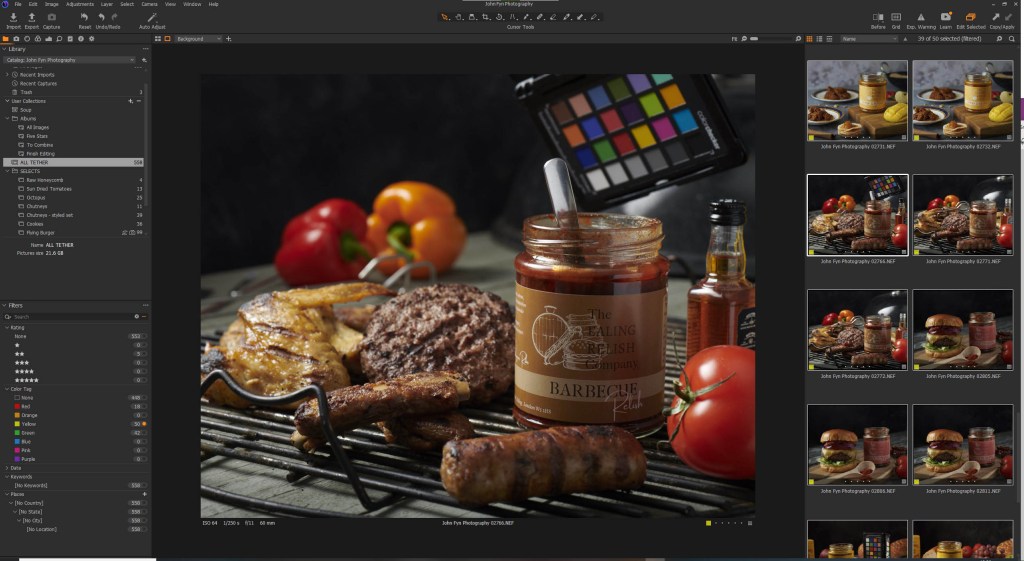
Capture One
Using them both?
Here’s is where the magic happens. It’s a bit of a faff coming up with a new workflow, but it’s worth it for studio shoot.
I have needed to build a workflow using the best parts of both Lightroom and Capture One Pro – essentially using the tether functionality in Capture One then moving the images across into Lightroom for processing and asset management.
I won’t go into the exact workflow here, that’s a whole other blog post so be sure to see next weeks blogs where I go through my Capture One and Lightroom workflow in detail.
And so ends the Capture One vs Lightroom debate for me. Both have their strong features and their weak points, ur finding a workflow that uses both their strengths I have the best of both worlds.
Work with John Fyn Photography
My goal is to represent your food, your creations and your dishes working with you to enhance the presentation of these and therefore creating feelings of appetite at first sight to your customers.
I normally cover Greater London and South-East England for commissioned work - if you’re further away don’t worry, we can work something out. I also shoot food products in my home studio, if you prefer, these can be sent directly to me.
Contact me now to have a chat about your requirements ...